结合实际工作,我们设计项目分支,比如现在需要开发一个网站,为实现它的某个新的功能需要创建一个分支。
此时,遇到很严重的问题需要紧急修补,从而为其建立一个分支,并在测试通过之后,切换到线上分支,合并这个修补分支。
新建分支
项目所在分支情况
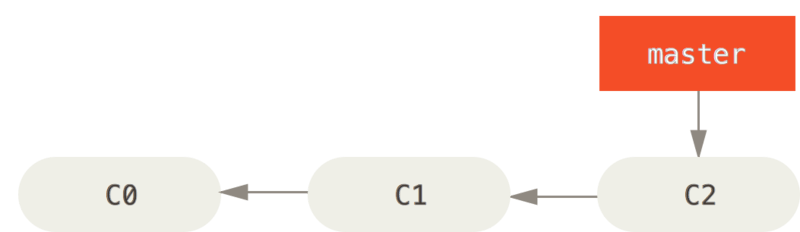
现在要解决问题追踪系统中的#53问题,可以建立一个分支,并在那个分支解决问题
$ git checkout -b iss53
Switched to a new branch "iss53"
上面命令等价于
$ git branch iss53
$ git checkout iss53
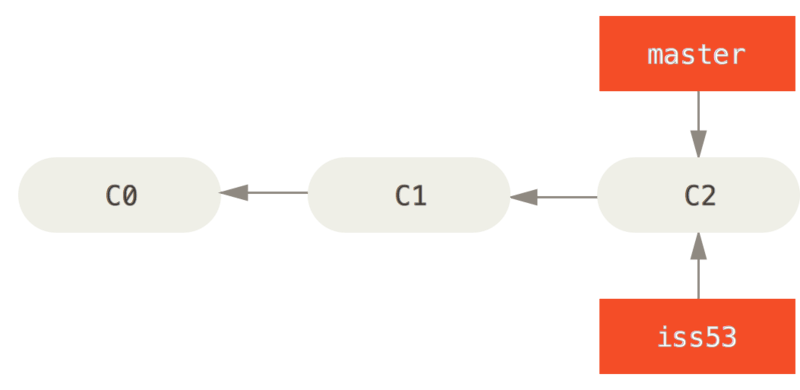
此时为解决#53问题,已经做了一些提交,则iss53分支将向前推进
$ vim index.html
$ git commit -a -m 'added a new footer [issue 53]'
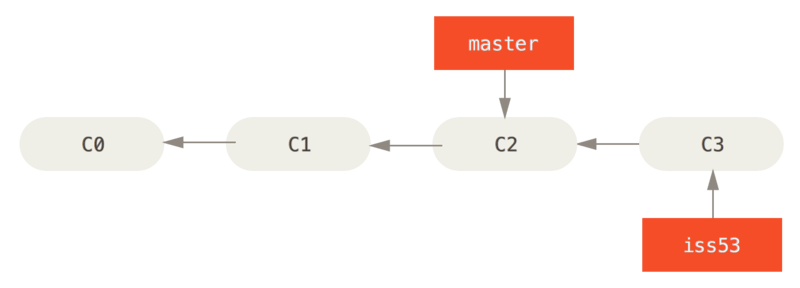
但是现在有紧急问题需要修改,而它无关53#问题,则可先切换回master分支。但是需要注意的是,在切换之前,先确定工作目录和暂存区有没有还没被提交的修改。
$ git checkout master
Switched to branch 'master'
现在针对紧急问题创建分支
$ git checkout -b hotfix
Switched to a new branch 'hotfix'
$ vim index.html
$ git commit -a -m 'fixed the broken email address'
[hotfix 1fb7853] fixed the broken email address
 1 file changed, 2 insertions(+)
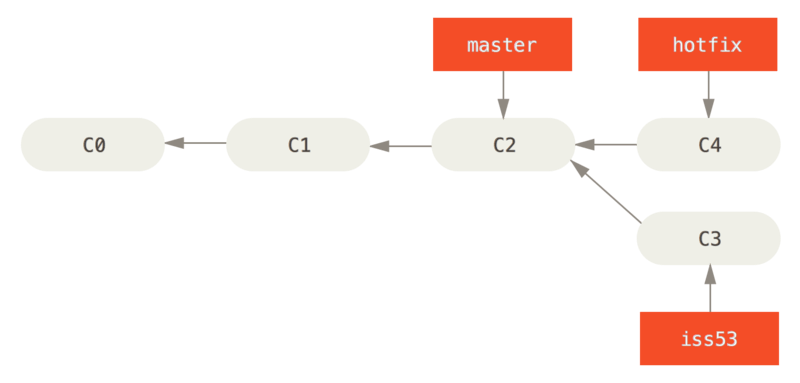
当运行测试,确保修改正确之后,可以将其合并到master分支,并部署到线上
$ git checkout master
$ git merge hotfix
Updating f42c576..3a0874c
Fast-forward
 index.html | 2 ++
 1 file changed, 2 insertions(+)
在合并的时候,看到如上的“快进”(fast-forward),这是由于当前master分支指向的提交是当前提交的上游,Git只需要简单的将指针向前移动。
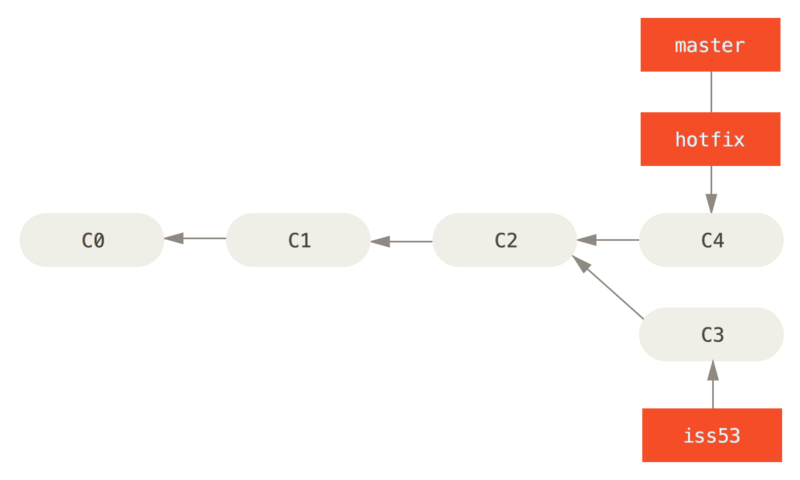
当紧急问题解决之后,可以删除hotfix分支
$ git branch -d hotfix
Deleted branch hotfix (3a0874c).
并切换回此前的#53问题分支
$ git checkout iss53
Switched to branch "iss53"
$ vim index.html
$ git commit -a -m 'finished the new footer [issue 53]'
[iss53 ad82d7a] finished the new footer [issue 53]
1 file changed, 1 insertion(+)
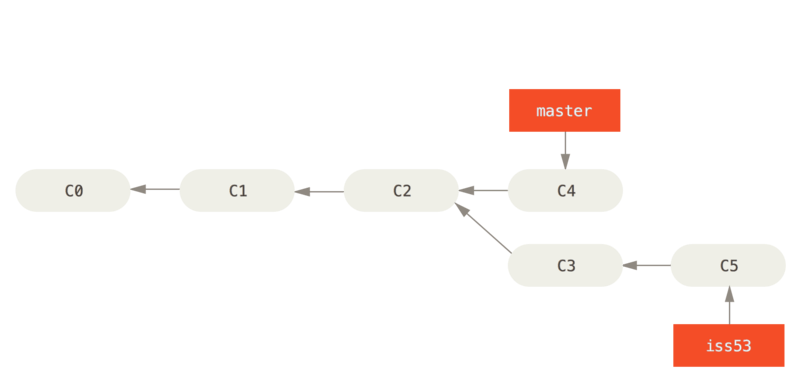
由于hotfix分支所做的工作并没有包含到iss53分支,如果需要拉取hotfix所做的修改,可以git merge master 将master分支合并到iss53分支;或者是等到iss53分支完成再将其合并回master分支。
分支的合并
假设,已经修正#53问题,并打算将其合并到master分支
$ git checkout master
Switched to branch 'master'
$ git merge iss53
Merge made by the 'recursive' strategy.
index.html |    1 +
1 file changed, 1 insertion(+)
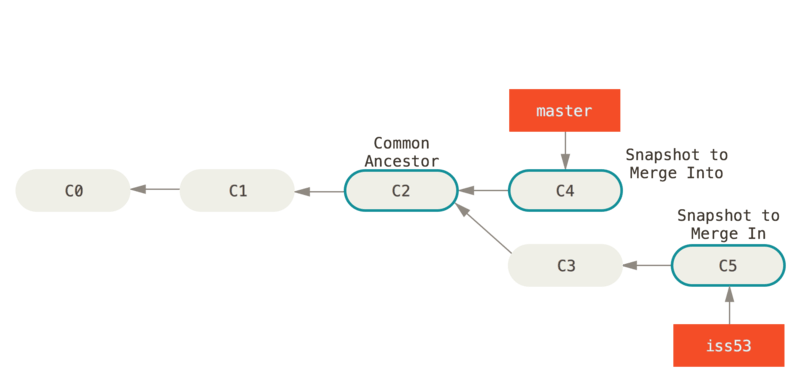
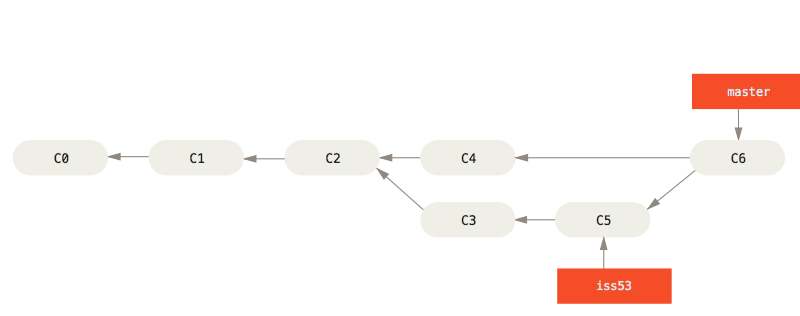
Git会自行决定选取哪一个提交作为最优的共同祖先,并以此作为合并的基础。
此时可以不再需要iss53分支,可以在任务追踪系统关闭此项任务,并删除这个分支。
$ git branch -d iss53
遇到冲突时的分支合并
如果在不同的分支,对同一个文件的同一部分做了不同的修改,Git就无法干净的合并它们。比如,对#53问题的修改和有关hotfix的修改都涉及到同一个文件的同一处,则在合并时会产生合并冲突
$ git merge iss53
Auto-merging index.html
CONFLICT (content): Merge conflict in index.html
Automatic merge failed; fix conflicts and then commit the result.
此时Git做了合并,但是没有自动创建新的合并提交,它会暂停下来,等待你去解决合并产生的冲突。
可以在合并冲突后的任何时刻,使用git status查看那些因包含合并冲突而处于未合并状态(unmerged)的文件
$ git status
On branch master
You have unmerged paths.
  (fix conflicts and run "git commit")

Unmerged paths:
  (use "git add <file>..." to mark resolution)

    both modified:      index.html

no changes added to commit (use "git add" and/or "git commit -a")
任何因包含合并冲突而有待解决的文件,都会以未合并状态标识出来。Git会在有冲突的文件中加入标准的冲突解决标记,这样方便手动解决冲突
<<<<<<< HEAD:index.html
<div id="footer">contact : email.support@github.com</div>
=======
<div id="footer">
 please contact us at support@github.com
</div>
>>>>>>> iss53:index.html
解决冲突方案是近保留其中一个分支的修改
<div id="footer">
please contact us at email.support@github.com
</div>
如果想使用图像化工具解决冲突,可以运行git mergetool ,它会启动一个合适的可视化合并工具
$ git mergetool

This message is displayed because 'merge.tool' is not configured.
See 'git mergetool --tool-help' or 'git help config' for more details.
'git mergetool' will now attempt to use one of the following tools:
opendiff kdiff3 tkdiff xxdiff meld tortoisemerge gvimdiff diffuse diffmerge ecmerge p4merge araxis bc3 codecompare vimdiff emerge
Merging:
index.html

Normal merge conflict for 'index.html':
  {local}: modified file
  {remote}: modified file
Hit return to start merge resolution tool (opendiff):
在解决完冲突文件,并暂存之后,即可git commit 完成合并提交
Merge branch 'iss53'

Conflicts:
    index.html
#
# It looks like you may be committing a merge.
# If this is not correct, please remove the file
#    .git/MERGE_HEAD
# and try again.


# Please enter the commit message for your changes. Lines starting
# with '#' will be ignored, and an empty message aborts the commit.
# On branch master
# All conflicts fixed but you are still merging.
#
# Changes to be committed:
#    modified:   index.html
#